
RECIPE CARD DOCUMENTATION
Getting started with Recipe Card
A printable, scalable recipe card for Divi 5.
This guide takes you from the zip file to a finished recipe in about ten minutes. Work through the four steps in order the first time; the other articles are here for when you need them.
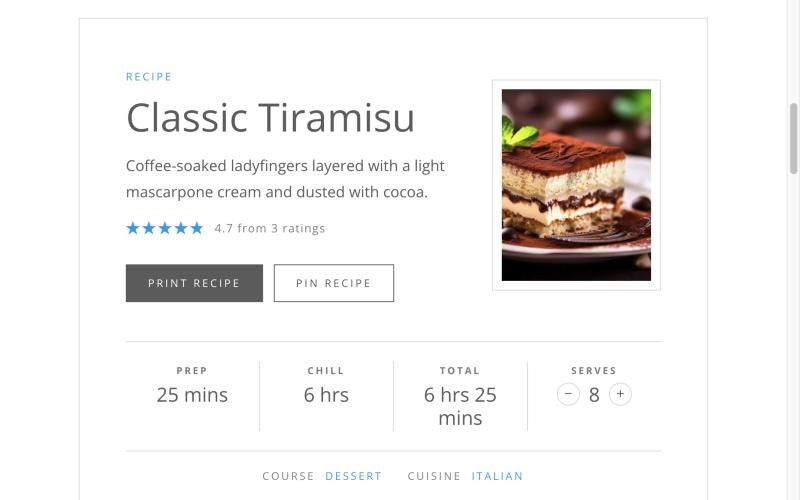
THE RECIPE CARD ON A PLAIN DIVI SITE
WHAT YOU DOWNLOADED
One plugin, two modules
Recipe Card is a WordPress plugin that adds two modules to the Divi Visual Builder. Keep the file zipped: WordPress wants the zip, not the folder inside it.
RECIPE-CARD-FOR-DIVI.ZIP
The plugin. You upload it under Plugins › Add Plugin. If it came with a Divi child theme such as Nicole, it is in that theme’s supplementary files.
TWO MODULES
Recipe Card holds the whole recipe. Recipe Jump Buttons puts Jump to Recipe and Print Recipe buttons above your story.
BEFORE YOU BEGIN
What you need
Recipe Card is a Divi 5 module, so Divi does the heavy lifting underneath it. It works on any Divi 5 site, with or without a child theme, and needs no other plugins.
REQUIREMENTS
WordPress 6.5 or later
PHP 7.4 or later
Divi 5, installed and active
THE FOUR STEPS
From zip file to finished recipe
Each step has its own article. Together they take about ten minutes.
STEP ONE
Install the plugin
Upload the zip and activate it. There are no settings to configure.
STEP TWO
Add a recipe card
Drop the Recipe Card module into a post and fill in the recipe, times and servings.
STEP THREE
Write the ingredients and method
One line each. A few simple habits give you groups, a US / Metric switch and servings that scale.
STEP FOUR
Style the card
It already follows your Divi colours and fonts. Here is how to change them for the card alone.
ALSO IN THIS GUIDE
More articles
Ready when you are.