
RATINGS
Star ratings
Readers rate the recipe when they leave a comment.
With ratings on, the comment form gets a row of stars, each rating shows on its comment, and the average appears under the recipe name and in your Google recipe data. Ratings use WordPress’s own comments, so there is nothing else to set up.
STEP ONE
Check comments are open
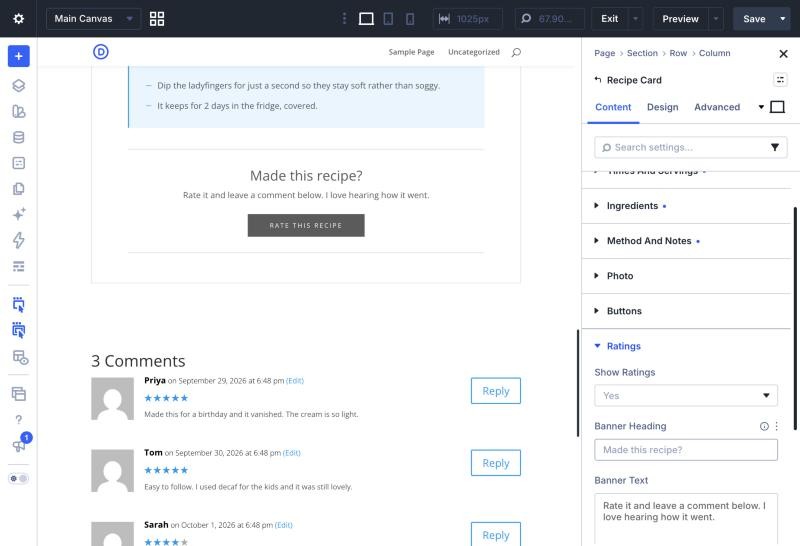
Ratings are on by default. They need comments to be open on the post, under Discussion in the post’s settings, or there is nowhere to leave one. To turn ratings off for a recipe, set Content › Ratings › Show Ratings to No.
STEP TWO
Word the banner
A banner at the foot of the card invites readers to rate the recipe. Change its heading, its line of text and the button text in the same Ratings group. The button takes readers down to the comment form.
STEP THREE
What readers see
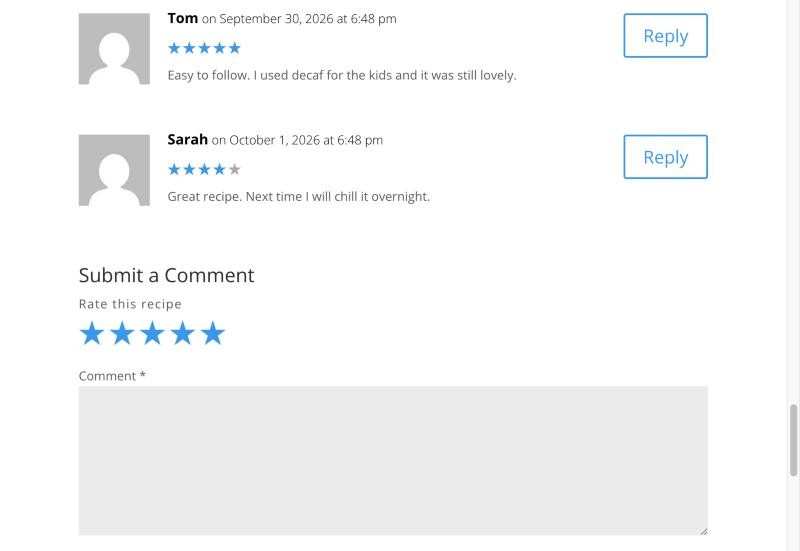
The stars sit above the comment box. A rating is optional, so readers can still comment without one. Each rating then shows as stars on its comment, and the average and the number of ratings show under the recipe name.
GOOD TO KNOW
Keeping ratings honest
ONLY APPROVED COMMENTS COUNT
Pending and spam comments never count, and replies never carry a rating. Approve, unapprove, edit or delete a comment under Comments and the average updates to match.
IF YOUR SITE USES PAGE CACHING
Set your cache to refresh at least every 12 hours. A rating left on a page that has been cached for longer than that can be dropped, although the comment itself still arrives.
Also in this guide