
REFERENCE
Theme Builder templates
The frame around every page and recipe.
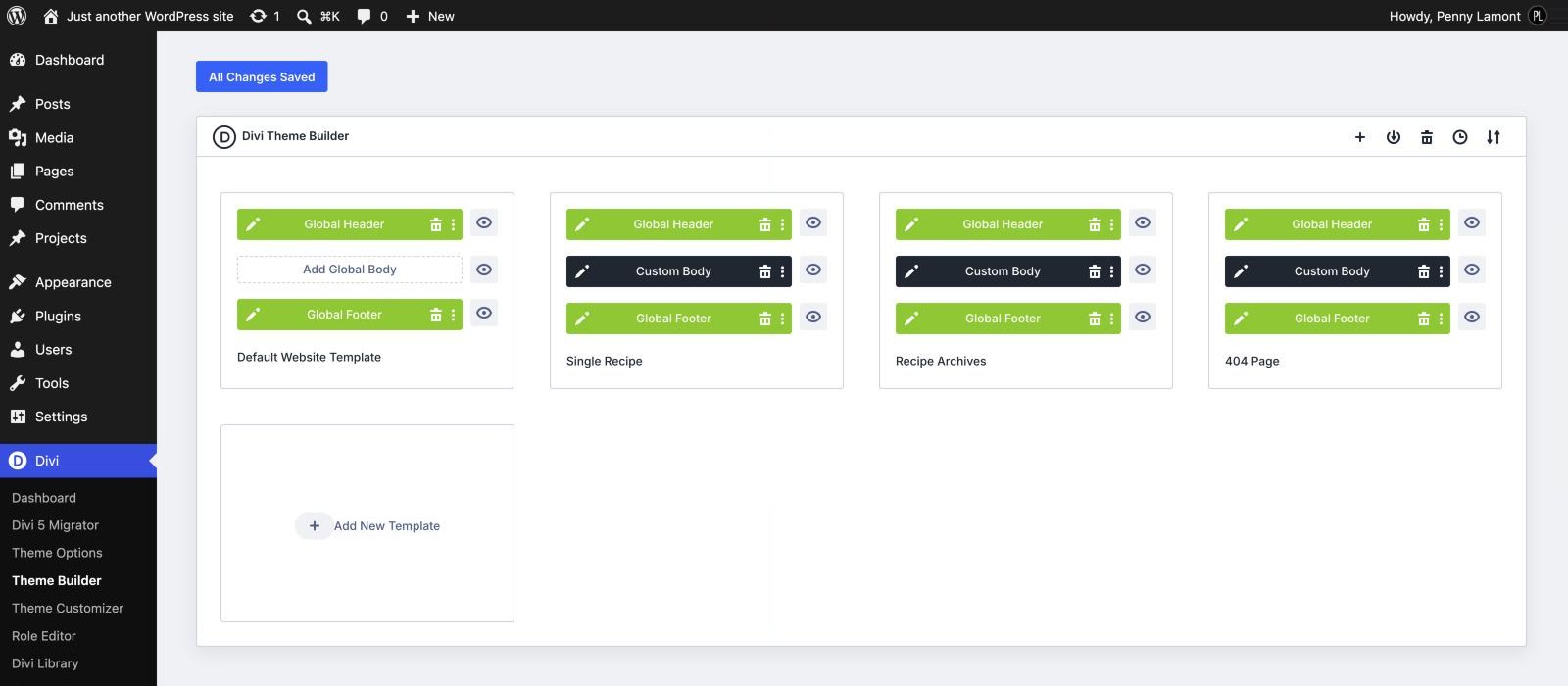
The header, the footer, the frame around every recipe, every category page and the not-found page are built once in Divi’s Theme Builder and applied wherever they are needed. Edit them under Divi › Theme Builder and the change lands everywhere at once. Your pages and recipes themselves are built in the Visual Builder as usual - the templates only supply what sits around them.
HOW A RECIPE PAGE IS MADE
Two layers: the template, and your post
Every recipe page you see is two things stacked together.
Your post is built in the Visual Builder, like any Divi page. It holds everything that changes from recipe to recipe: the Jump to Recipe buttons, your story and photos, the ad slot after the opening paragraphs, the “What you’ll need” panel and the recipe card. Open a recipe and click Enable Visual Builder to edit it.
The Single Recipe template wraps around it and supplies everything that is the same on every recipe: the title, date and category at the top, the featured photo, the affiliate disclosure, the second ad slot after your recipe, the comments and “You might also like”. In the middle of the template is a Post Content module - that is the space where each post’s own layout appears.
HOW A RECIPE PAGE IS MADE
Which one to edit
If you want to change one recipe, edit the post. If you want to change every recipe at once - move the comments, reword the disclosure, drop the related recipes - edit the template under Divi › Theme Builder.
This is also why, when you open a recipe in the Visual Builder, you will not see its title, photo or comments: they belong to the template, not the post. The same split applies to pages, which get only the header and footer from the template and are otherwise entirely your own layout.
THE TEMPLATES
What each one covers
FOUR TEMPLATES
Nicole Default — The site header and footer, used by every page and post. Pages have no other template, so everything between the header and footer is the page’s own Divi layout.
Single Recipe — Every post. It supplies the title, date and category, the framed featured photo, the affiliate disclosure, an ad slot, the comments and “You might also like” - and shows the post’s own Divi layout in between.
Recipe Archives — Every category page, plus tag and date archives and search results: a heading band with the archive’s name, a banner ad slot and the recipe grid. These pages have no content of their own, so the template is the whole page.
404 Page — The not-found page: a short message, buttons to the recipes and the Recipe Index, and the latest recipes.
THE HEADER
The name, the tagline and the menu
The site name and the tagline above the menu are two Text modules, so you can retype them directly in the header layout. To use a logo image instead, swap the name’s Text module for an Image module.
The menu bar below them stays at the top of the screen as the reader scrolls. That is set in the section’s Sticky options, so it can be switched off there without touching code.
THE HEADER
The Subscribe button and the dropdown
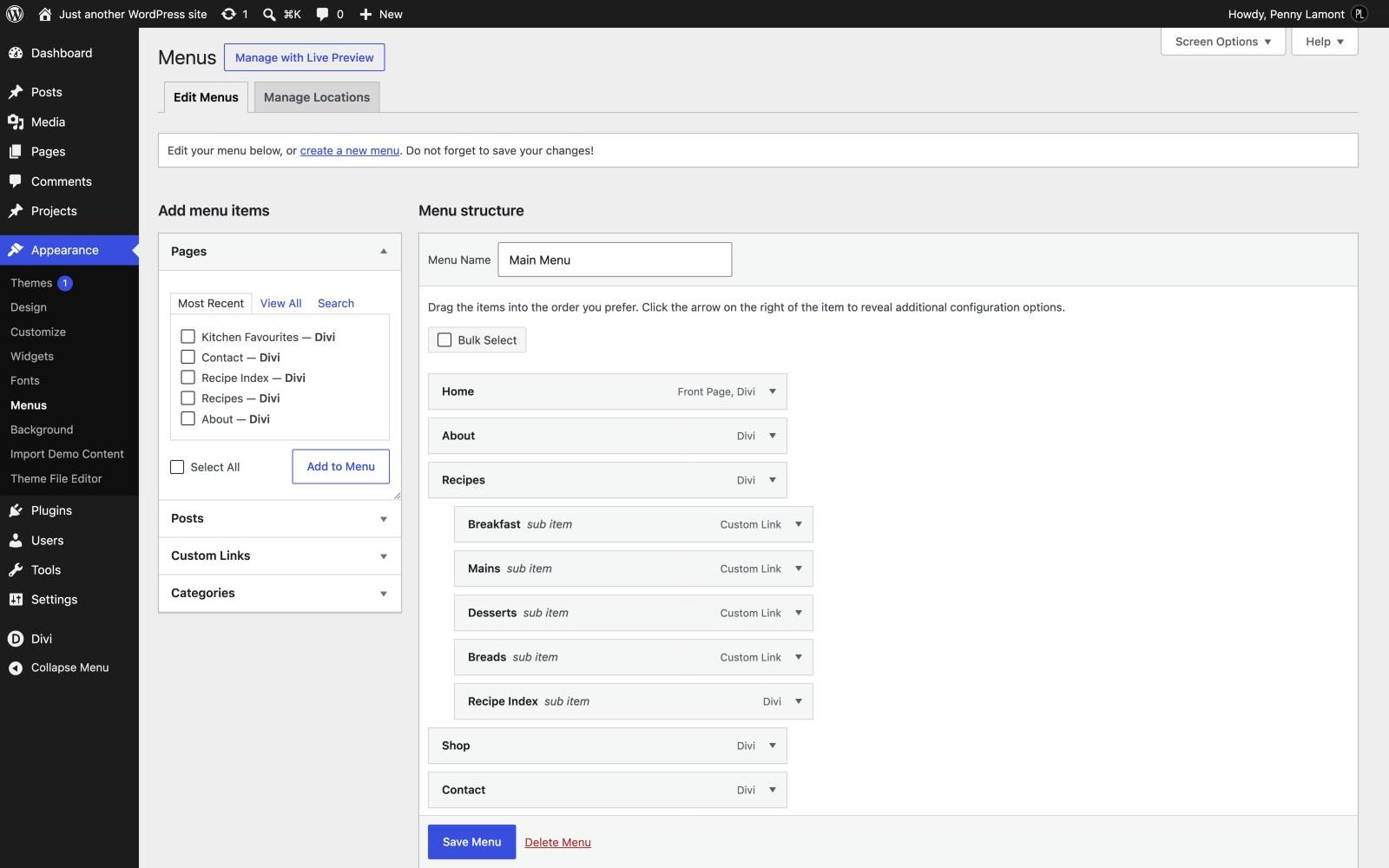
The outlined Subscribe button at the end of the menu is an ordinary menu item carrying the class nicole-menu-cta, and it links to #subscribe, the newsletter band in the footer. Remove the class under Appearance › Menus and it becomes a plain link again. (If the class field is hidden there, switch on CSS Classes under Screen Options.)
The Recipes item opens a dropdown with the four categories and the Recipe Index. Its square-cornered panel is styled in the child theme, and it sizes itself to the longest label, so renaming a category is safe.
THE FOOTER
Newsletter, links and the small print
The footer layout has three parts. The dark sign-up band comes first, which is why it appears on every page, recipe and archive without being added to any of them. Below it, four columns: the site name and tagline, an Explore column of page links, a Recipes column of category links, and a Follow along column with your social links and email address. A slim bar at the very bottom carries the copyright line and the link to your Privacy Policy.
The links are ordinary text, so you edit them by clicking into the column in the footer layout. Change the Instagram and Pinterest links to your own profiles, and the email address to yours.
THE RECIPES
The related recipes never repeat the one you are on
“You might also like” under each recipe shows the three newest recipes. Divi’s Blog module has no setting to leave out the current post, so the child theme does it for you: a reader never sees the recipe they are reading offered back to them.
THE RECIPES
Archives and search share one template
The Recipe Archives template applies to all archives and to search results, so a category page, a tag page and a search all look the same. The heading reads the archive’s own name. If you want categories to look different from search results, duplicate the template and change the conditions on each copy.
Next