
STEP ONE OF FOUR
Installing the plugin
Two minutes, and nothing to configure.
Divi 5 must be installed and active before you begin, because Recipe Card is a Divi module. There is no settings page: once the plugin is active, its two modules are waiting in the Visual Builder.
STEP ONE
Download the file
Download recipe-card-for-divi.zip from the Marketplace account where you purchased. If it came with a Divi child theme such as Nicole, you will find it in that theme’s supplementary files. Keep it zipped.
STEP TWO
Upload and install
In WordPress, go to Plugins › Add Plugin and click Upload Plugin. Choose recipe-card-for-divi.zip, then click Install Now.
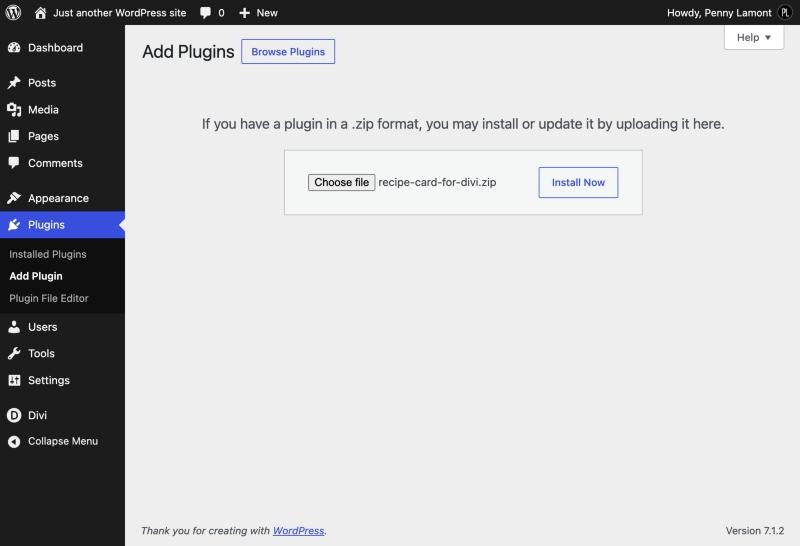
STEP THREE
Activate
When WordPress says the plugin installed successfully, click Activate Plugin. It now appears in your plugin list as Recipe Card for Divi.

WHAT TO EXPECT
Nothing changes yet
That is exactly right. The plugin only shows on a page once you add one of its modules, so your existing posts are untouched.
UPDATING TO A NEW VERSION
Upload the new zip the same way. When WordPress says the plugin is already installed, choose Replace current with uploaded. Your recipes live in your posts, so nothing is lost.
RECIPE CARD NEEDS DIVI 5
The modules are built for the Divi 5 Visual Builder. On Divi 4 they will not appear.
Next